Insights & Resources

Insights & Resources

Web Design, SEO & Digital Strategy Insights for Construction Companies

The Masthead Technology blog covers website design, SEO, project portfolio strategy, website support, recruiting-focused web content, and digital best practices for construction companies, contractors, developers, engineers, and trade businesses looking to build a stronger online presence.

In today’s digital world, even traditional services like plumbing require a strong online presence. Gone are the days when homeowners relied solely on word-of-mouth recommendations or the phone book to find a plumber. Now, they turn to search engines and online directories, often choosing the service that appears most professional and reliable. For plumbing businesses, having a well-designed website can make all the difference. This is where a plumber web design company comes into play.

A professional web design company that specializes in creating websites for plumbers understands the unique needs of your business and knows how to build a website that attracts new customers. In this blog post, we’ll explore the benefits of hiring a plumber web design company, what to expect when working with one, and why investing in a high-quality website is crucial for the growth of your plumbing business.

Why Plumbers Need a Professional Website

Before diving into what a plumber web design company can offer, it’s essential to understand why a website is vital for your plumbing business.

1. Build Credibility and Trust

Your website is often the first point of contact between you and potential customers. A professionally designed website establishes credibility and trust, showing that you are a legitimate, experienced, and reliable plumbing service provider. It provides a platform where you can showcase your expertise, customer reviews, and completed projects, helping potential clients feel confident in choosing your services.

2. Attract More Local Customers

Most people looking for plumbing services search online, often specifying their location. A well-optimized website can help your business appear in local search results, making it easier for potential customers in your area to find you. Without a website, you miss out on a significant number of leads from customers who are searching online for the services you offer.

3. 24/7 Availability and Customer Support

A website serves as your 24/7 online storefront, providing essential information about your services, contact details, and operating hours. It allows customers to find answers to their questions, request quotes, or book services anytime, even outside of business hours. This round-the-clock accessibility can significantly enhance customer satisfaction and increase your chances of securing more jobs.

4. Showcase Services and Expertise

A professional website allows you to showcase your plumbing services, whether it’s residential plumbing, commercial plumbing, emergency repairs, or specialized services like water heater installation. You can provide detailed descriptions, FAQs, pricing information, and photos of past projects to give visitors a clear understanding of what you offer.

5. Boost Your Online Visibility

With the right design and SEO strategy, your website can help improve your online visibility, making it easier for potential customers to find you. A website optimized for search engines can rank higher in search results for keywords like “emergency plumber near me” or “water heater installation,” driving more organic traffic to your site and generating more leads.

What a Plumber Web Design Company Can Do for You

A plumber web design company specializes in creating websites tailored to the specific needs of plumbing businesses. Here’s what you can expect when you hire a professional company to build and manage your website:

1. Custom Design Tailored to Your Brand

A generic website won’t help you stand out in the competitive plumbing industry. A plumber web design company will create a custom website that reflects your brand’s identity and values. They’ll use your logo, brand colors, and other design elements to ensure the website aligns with your business’s professional image.

Custom Design Services Include:

  • A clean, modern layout that’s easy to navigate.
  • High-quality images showcasing your team, equipment, and completed projects.
  • Responsive design to ensure the site looks great and functions well on all devices, including smartphones and tablets.

2. User-Friendly and Conversion-Oriented Layout

An effective plumbing website isn’t just about aesthetics; it’s about functionality and driving conversions. A professional design company will structure your website to guide visitors toward key actions, such as contacting you, requesting a quote, or booking a service.

Features of a Conversion-Oriented Layout:

  • Clear calls-to-action (CTAs): Prominent buttons like “Call Now,” “Request a Quote,” or “Book a Service” placed strategically throughout the site.
  • Easy navigation: Simple menus and well-organized content help visitors find what they’re looking for quickly.
  • Contact forms: User-friendly forms that allow potential customers to get in touch, request quotes, or schedule services directly from your website.

3. SEO Optimization for Local Search

A plumber web design company will implement SEO (Search Engine Optimization) strategies to improve your website’s visibility in search engines. Local SEO is particularly important for plumbing businesses, as most customers are looking for services in their specific area.

Key Local SEO Services Include:

  • Keyword optimization: Incorporating keywords like “emergency plumbing services,” “leak repair,” and “[City Name] plumber” into your website’s content.
  • Meta tags: Optimizing meta titles, descriptions, and header tags to enhance your site’s relevance for local searches.
  • Google My Business integration: Setting up and linking your Google My Business profile to improve your local search rankings and attract more customers in your area.

4. Service Pages and Content Creation

Your website should clearly outline the services you offer. A plumber web design company will create individual pages for each of your services, providing detailed information and answering common questions. This not only helps educate potential customers but also improves your SEO by targeting specific keywords related to each service.

Content Creation Services Include:

  • Writing engaging and informative service descriptions.
  • Creating blog posts and articles about plumbing tips, maintenance guides, and industry news.
  • Including testimonials and case studies to build credibility and showcase successful projects.

5. Mobile Optimization

More than half of all web traffic comes from mobile devices. If your website isn’t optimized for mobile users, you risk losing potential customers. A plumber web design company ensures your website is mobile-friendly, with a responsive design that adapts to different screen sizes, providing a seamless experience for visitors on smartphones and tablets.

6. Integration with Online Booking and Contact Forms

Customers appreciate the convenience of booking services online. A professional web design company can integrate online booking systems and contact forms into your website, making it easy for visitors to schedule appointments or request quotes.

Key Integrations:

  • Online booking: Allow customers to book appointments directly through your website.
  • Contact forms: Include forms for general inquiries, quote requests, or service bookings.
  • Live chat: Optional integration of a live chat feature for real-time customer support.

7. Website Maintenance and Support

Building a website is just the first step; ongoing maintenance is essential to keep it running smoothly. A plumber web design company will provide maintenance services, including software updates, security checks, performance optimizations, and content updates, ensuring your website remains fast, secure, and up-to-date.

How to Choose the Right Plumber Web Design Company

With many web design companies out there, it’s important to find one that specializes in the unique needs of plumbing businesses. Here’s how to choose the right partner for your website:

1. Experience with Plumbing Websites

Look for a company with experience in designing and developing websites for plumbing businesses. They’ll have a better understanding of the industry, customer needs, and the specific elements required for an effective plumbing website.

2. Review Their Portfolio

Ask to see examples of their previous work. A reputable plumber web design company should have a portfolio showcasing websites they’ve built for similar businesses. Review their designs to see if they align with your vision and branding.

3. SEO Expertise

Choose a company that offers SEO services and has a track record of improving local search rankings for their clients. A well-designed website is only effective if it’s visible to your target audience.

4. Ongoing Support and Maintenance

Ensure the company provides ongoing support and maintenance services. Your website will need regular updates, security checks, and content revisions to remain effective and secure.

5. Transparent Pricing

Request a detailed quote outlining the cost of website design, development, hosting, maintenance, and any additional services. Transparency in pricing helps you avoid unexpected expenses and allows you to budget effectively.

Conclusion

Investing in a professional website is crucial for plumbing businesses looking to grow and attract more customers. A plumber web design company has the expertise to create a website tailored to your brand, optimized for search engines, and designed to convert visitors into customers. From custom design to SEO optimization, content creation, and ongoing support, they can handle every aspect of building and maintaining an effective online presence for your business.

At Masthead Technology, we specialize in creating high-quality websites for plumbing businesses. Our team understands the unique needs of plumbers and knows how to design a site that boosts your credibility, attracts local customers, and drives growth. Contact us today to learn how we can build a website that works for your business.

FAQs

1. How much does a plumber website cost?
The cost varies depending on the complexity and features of the website. Basic websites may start around $1,000, while more advanced, custom-built sites with online booking, SEO, and content creation services can range from $3,000 to $10,000 or more.

2. How long does it take to build a plumbing website?
The timeline depends on the scope of the project. A basic website may take 2-4 weeks to complete, while a more complex site with custom features, SEO, and content creation could take 1-3 months.

3. What should be included on a plumbing website?
Your website should include information about your services, contact details, customer reviews, service area, online booking options, and a blog with plumbing tips. Including FAQs and detailed service pages can also enhance your site’s SEO.

4. Can I update my website content after it’s built?
Yes, most websites are built using content management systems (CMS) like WordPress, allowing you to easily update content, images, and blog posts. Your web design company can provide training on how to make updates.

5. Do I need SEO for my plumbing website?
Absolutely! SEO is essential for improving your website’s visibility in search engines, helping potential customers find your services when they search for terms like “emergency plumber” or “drain cleaning near me.” A web design company with SEO expertise can optimize your site for better rankings and more traffic.

Running a WordPress website is usually smooth sailing—until it’s not. One moment everything is functioning perfectly, and the next, you’re facing a critical issue that can take your website offline, cause data loss, or leave you vulnerable to security threats. Whether it’s a sudden crash, a security breach, or a malfunctioning plugin, emergencies can strike at any time, and knowing how to get WordPress emergency help is crucial to restoring your site quickly.

In this post, we’ll cover common WordPress emergencies, what you can do to resolve them, and how to find expert help when things go awry.

Common WordPress Emergencies

WordPress is a versatile and reliable platform, but like any technology, it can encounter issues that require immediate attention. Here are some of the most common WordPress emergencies:

1. White Screen of Death (WSOD)

When your website suddenly displays a blank white screen, it’s known as the White Screen of Death. This issue can occur due to plugin or theme conflicts, PHP errors, or memory limit exhaustion.

2. Website Crashes or Downtime

Your website crashing or going offline can happen for various reasons, such as server issues, database problems, or a sudden spike in traffic. Downtime can result in lost revenue and a poor user experience.

3. Hacked Website

If your site has been hacked, you might notice suspicious changes, defaced pages, or malicious redirects. Security breaches can compromise sensitive information and damage your reputation.

4. Plugin or Theme Conflicts

WordPress plugins and themes enhance your site’s functionality, but they can sometimes conflict with each other or the WordPress core, leading to crashes or broken features.

5. Broken Links and Error 404 Pages

Broken links or frequent 404 errors can frustrate users and harm your SEO rankings. These issues usually arise after changing URLs, deleting pages, or modifying your permalink structure.

6. Unable to Access the Admin Dashboard

Being locked out of your WordPress admin dashboard can happen due to incorrect login credentials, security plugins blocking access, or database connection errors.

Immediate Steps for WordPress Emergency Help

When your website faces a critical issue, taking quick action is key to minimizing damage. Here’s a step-by-step guide on what to do if you encounter a WordPress emergency:

1. Stay Calm and Back Up Your Website

The first step is to stay calm and avoid making rushed changes that could make the situation worse. If your site is still accessible, create a full backup of your website, including the database and files. This way, you have a fallback option if further troubleshooting leads to additional problems.

2. Check for the Source of the Problem

Try to identify the root cause of the issue by checking the following:

  • Recent changes: Did you recently install a new plugin, update a theme, or make changes to the WordPress core?
  • Error messages: Look for error messages on your site or in the WordPress error log (wp-content/debug.log).
  • Hosting provider: Check with your hosting provider for server-side issues or scheduled maintenance that might be affecting your website.

3. Disable Plugins and Themes

If you suspect a plugin or theme conflict, disable them temporarily to identify the culprit:

  • Via the dashboard: If you can still access your WordPress admin, go to “Plugins” and deactivate all plugins. If the site comes back online, reactivate them one by one to identify the problematic plugin.
  • Via FTP: If you can’t access the dashboard, use an FTP client to rename the plugins folder in wp-content. This will disable all plugins.

4. Restore from a Backup

If you have a recent backup of your website, restoring it can often resolve issues caused by accidental changes, updates, or hacks. Most managed WordPress hosting providers offer automated backups and one-click restore options.

5. Check Your Error Logs

WordPress error logs can provide valuable insights into what’s causing your website to malfunction. Enable debugging in your wp-config.php file by adding the following line:
define('WP_DEBUG', true);
define('WP_DEBUG_LOG', true);
This will create a debug log in the wp-content directory, which you can review for error messages and warnings.

When to Seek Professional WordPress Emergency Help

While some issues can be resolved with basic troubleshooting, others require the expertise of a professional. Here are situations where you should seek WordPress emergency help from an expert:

1. Security Breaches and Hacks

If your website has been hacked, it’s critical to get professional help immediately. An expert can identify the point of entry, remove malicious code, and implement enhanced security measures to prevent future breaches.

2. Database Corruption

Database corruption can lead to data loss and broken functionalities. A developer with experience in database management can repair or restore the database while preserving as much data as possible.

3. Complex Error Messages

Encountering complex PHP errors, server errors, or compatibility issues with third-party services often requires a deep understanding of WordPress development and server environments. In these cases, an experienced WordPress developer is your best resource.

4. Website Redesign or Migration Issues

Problems that arise during a website redesign or migration, such as broken links, theme conflicts, or loss of content, may need professional intervention to fix efficiently.

How to Get WordPress Emergency Help

Here’s how you can find the right help when you’re facing a WordPress emergency:

1. Contact Your Hosting Provider

Start by reaching out to your hosting provider’s support team. Many managed WordPress hosts offer 24/7 support and can assist with server-related issues, backups, and malware scans. Reputable hosting providers like WP Engine, SiteGround, and Bluehost have specialized WordPress support teams.

2. Hire a WordPress Professional

If your hosting provider can’t resolve the issue, consider hiring a WordPress expert. Look for professionals or agencies that offer WordPress emergency help services. They can provide:

  • Immediate troubleshooting and problem resolution.
  • Security scans, malware removal, and firewall setup.
  • Plugin and theme conflict resolution.
  • Backup restoration and database repair.

3. Use WordPress Maintenance Services

Subscribing to a WordPress maintenance service provides ongoing support to keep your site running smoothly. These services usually include:

  • Regular backups.
  • Security monitoring and malware removal.
  • Plugin and theme updates.
  • Performance optimization.

Having a maintenance plan in place means you can get help quickly whenever an emergency arises.

4. Visit WordPress Support Forums

If the issue is not critical and you’re comfortable troubleshooting, visit the WordPress Support Forums. The forums are filled with helpful advice from experienced developers and community members who may have encountered similar issues.

Preventing Future WordPress Emergencies

While you can’t predict every possible issue, implementing best practices can reduce the likelihood of future emergencies:

1. Regular Backups

Set up automatic daily backups of your website files and database. Most managed WordPress hosts offer automated backup solutions. Additionally, you can use plugins like UpdraftPlus or BackupBuddy to manage backups.

2. Security Measures

  • Install a security plugin like Wordfence or Sucuri to monitor your website for malware and unauthorized access.
  • Use strong, unique passwords and implement two-factor authentication (2FA) for your WordPress admin accounts.
  • Keep your WordPress core, themes, and plugins updated to the latest versions to avoid vulnerabilities.

3. Staging Environment for Testing

Use a staging environment to test updates, new plugins, and design changes before applying them to your live site. This minimizes the risk of conflicts and errors affecting your live website.

4. Choose Reliable Hosting

Select a managed WordPress hosting provider with a reputation for reliability, excellent support, and security features. Good hosting can prevent downtime and help quickly resolve server-related issues.

Conclusion

Facing a WordPress emergency can be stressful, but knowing how to get WordPress emergency help can make all the difference in resolving issues quickly and minimizing damage. By following the troubleshooting steps outlined above and seeking professional assistance when needed, you can get your website back on track and ensure it remains secure and functional.

At Masthead Technology, we specialize in providing WordPress emergency support and maintenance services. Whether you’re dealing with a sudden crash, security breach, or technical error, our team is here to help. Contact us today for expert WordPress emergency help and to learn how we can keep your website running smoothly.

FAQs

1. How do I know if my WordPress website has been hacked?
Signs of hacking include unexpected changes to your content, new users you didn’t create, defaced pages, strange pop-ups, or your website being flagged as unsafe by browsers or search engines.

2. Can I restore my website from a backup?
Yes, if you have a recent backup of your website, you can restore it to recover from errors, crashes, or hacking incidents. Many hosting providers offer automated backup solutions with one-click restore options.

3. What is the best way to prevent WordPress emergencies?
Regular maintenance is key. Keep your WordPress core, themes, and plugins updated, implement security measures, and create regular backups to safeguard your website.

4. Should I hire a professional for WordPress emergency help?
If you’re dealing with a complex issue, such as a hack, database corruption, or persistent errors, hiring a professional is the best way to resolve the problem quickly and safely.

5. How often should I back up my WordPress website?
It’s recommended to back up your website daily, especially if you frequently add new content. Automated backups ensure you always have a recent copy of your site available in case of an emergency.

In today’s digital age, users access websites from a myriad of devices with varying screen sizes and resolutions. Ensuring that your website looks and functions well on all these devices is no longer a luxury but a necessity. This is where responsive web design comes into play. At Masthead Technology, we prioritize responsive web design in all our projects, and here’s why it’s crucial for your website.

Enhanced User Experience

Seamless Browsing Across Devices

Responsive web design ensures that your website adapts to different screen sizes, providing a seamless browsing experience. Whether users are accessing your site from a desktop, tablet, or smartphone, they will encounter a consistent and user-friendly interface. This adaptability is key to meeting the diverse needs of today’s internet users.

Reduced Bounce Rates

A website that doesn’t function well on mobile devices can frustrate users, leading to higher bounce rates. Responsive design improves usability, keeping visitors on your site longer and encouraging them to explore more pages. When users can easily navigate your site and find what they’re looking for, they’re more likely to stay engaged.

Improved SEO Rankings

Google’s Mobile-First Indexing

Google now uses mobile-first indexing, meaning it predominantly uses the mobile version of the content for indexing and ranking. A responsive website is more likely to rank higher in search engine results, as it provides a better mobile experience. This shift emphasizes the importance of having a site that works well on mobile devices.

Single URL for All Devices

With responsive design, you maintain a single URL for both desktop and mobile versions of your site. This simplifies your SEO efforts by consolidating your traffic and backlinks, leading to better search engine performance. Having a single URL ensures that all of your SEO value is directed to one place, rather than being split between multiple versions of your site.

Cost and Time Efficiency

Single Site Maintenance

Maintaining separate desktop and mobile versions of a website can be time-consuming and costly. Responsive design eliminates the need for multiple versions, streamlining updates and maintenance efforts. With one site to manage, you can save both time and money, allowing you to focus on other important aspects of your business.

Future-Proofing Your Website

As new devices with varying screen sizes and resolutions are introduced, a responsive website will automatically adapt, reducing the need for frequent redesigns. This adaptability ensures that your site remains functional and aesthetically pleasing across all current and future devices.

Increased Conversion Rates

Consistent User Experience

A responsive website ensures that users have a consistent experience, regardless of the device they use. This consistency builds trust and makes it easier for users to navigate and complete actions, such as making purchases or filling out forms. A unified experience across devices is crucial for maintaining user satisfaction and encouraging conversions.

Optimized for Touch and Click

Responsive design not only resizes the layout but also optimizes elements like buttons and navigation for touchscreens. This makes it easier for mobile users to interact with your site, leading to higher conversion rates. By ensuring that your site is easy to use on all devices, you can improve user engagement and drive more conversions.

Better Analytics and Reporting

Unified Analytics

With a single responsive site, tracking user behavior and gathering insights is simplified. You can analyze traffic and user engagement more accurately without having to reconcile data from separate desktop and mobile sites. Unified analytics provide a clearer picture of how users interact with your site, making it easier to identify areas for improvement.

Improved Decision Making

Unified analytics help you make better-informed decisions about your website’s design and content, optimizing the user experience and enhancing overall performance. By understanding how users interact with your site, you can make data-driven decisions that improve user satisfaction and drive business success.

Conclusion

Responsive web design is essential in today’s multi-device world. It enhances user experience, improves SEO rankings, saves time and costs, boosts conversion rates, and simplifies analytics and reporting. At Masthead Technology, we integrate responsive design into all our projects to ensure your website meets the demands of the modern web. Contact us today to learn how we can help create a responsive website that drives results and keeps your users engaged.

FAQs

What is responsive web design? Responsive web design ensures that a website adapts to various screen sizes and devices, providing a seamless user experience.

Why is responsive web design important for SEO? Google’s mobile-first indexing prioritizes mobile-friendly websites, making responsive design crucial for higher search engine rankings.

How does responsive design affect user experience? Responsive design provides a consistent and user-friendly experience across all devices, reducing bounce rates and increasing user engagement.

Can responsive web design save time and money? Yes, maintaining a single responsive site is more efficient than managing separate versions for different devices, saving time and costs.

What impact does responsive design have on conversion rates? A consistent and optimized user experience across devices increases user trust and makes it easier to complete actions, boosting conversion rates.

How does responsive design simplify analytics? With a single responsive site, you can track and analyze user behavior more accurately, making it easier to gather insights and make informed decisions.


A well-designed website is a powerful tool that goes beyond just showcasing your products or services. It plays a crucial role in supporting various business functions, including sales and human resources (HR). At Masthead Technology, we understand the multifaceted value of a robust website. Here’s how your website can support both sales and HR, driving revenue and attracting top talent.

Supporting Sales

Lead Generation and Conversion

Attracting Prospects: Your website is often the first point of contact for potential customers. By optimizing your site for search engines (SEO), you can attract high-quality traffic. Well-crafted landing pages, compelling calls-to-action (CTAs), and valuable content can turn visitors into leads.

Capturing Leads: Using forms, live chat, and contact pages, your website can capture essential information about prospects. Integrating these features with Customer Relationship Management (CRM) systems ensures that leads are nurtured effectively.

E-Commerce and Online Sales

Product Listings: For e-commerce businesses, a website is a storefront. Clear, detailed product listings with high-quality images and descriptions help customers make informed purchasing decisions.

Secure Transactions: Secure payment gateways integrated into your site build trust and provide a seamless purchasing experience, boosting sales and customer satisfaction.

Sales Support Tools

Customer Reviews and Testimonials: Showcasing customer reviews and testimonials on your website can build trust and credibility. Prospective buyers are more likely to convert when they see positive feedback from other customers.

Detailed Analytics: Your website can provide valuable data about customer behavior. Tools like Google Analytics help you understand which products are popular, where visitors drop off, and how to optimize the sales funnel.

Supporting HR

Attracting Top Talent

Company Culture and Values: Your website is a platform to showcase your company culture and values. Job seekers often visit company websites to learn more about potential employers. Highlighting your mission, vision, and work environment can attract candidates who align with your company’s ethos.

Career Opportunities: A dedicated careers page with detailed job descriptions and an easy application process can streamline recruitment. Clearly outlining the benefits and growth opportunities your company offers can make it more attractive to top talent.

Employee Testimonials: Featuring testimonials from current employees can provide insight into the work environment and company culture, helping to attract candidates who fit well within your organization.

Efficient Recruitment Process

Online Applications: Allowing candidates to apply directly through your website simplifies the recruitment process. Integrating application forms with Applicant Tracking Systems (ATS) can automate and streamline hiring.

Pre-Screening Tools: Incorporating pre-screening tools like quizzes or skill assessments can help filter candidates, ensuring that only the most qualified applicants proceed to the next stage.

Enhancing Internal Communication and Training

Employee Portal: An internal portal accessible through your website can provide employees with important resources, company news, and training materials. This central hub enhances communication and ensures that employees have access to the information they need.

Online Training: Offering online training modules and resources through your website can facilitate continuous learning and development. This supports employee growth and helps maintain a skilled workforce.

Improving Employer Brand

Brand Consistency: A professional, well-maintained website reinforces your employer brand. Consistent messaging, high-quality visuals, and user-friendly navigation reflect positively on your company, making it more appealing to both customers and potential employees.

Social Media Integration: Integrating social media feeds and links on your website can enhance your online presence and showcase your company’s engagement with the wider community. This connectivity can appeal to candidates and customers alike.

Case Studies and Success Stories

Sales Success: Showcasing case studies and success stories on your website demonstrates the effectiveness of your products or services. Highlighting real-world results can build credibility and drive sales.

HR Success: Sharing stories of employee achievements and career growth within your company can attract new talent and inspire current employees. These stories reflect a positive work environment and commitment to employee development.

Conclusion

Your website is a versatile tool that supports both sales and HR functions, driving business growth and efficiency. By leveraging your online presence to generate leads, attract top talent, and enhance internal processes, you can create a competitive advantage. At Masthead Technology, we specialize in building websites that meet the diverse needs of businesses. Contact us today to learn how we can help you optimize your website to support your sales and HR goals.

FAQs

How can a website support sales efforts? A website supports sales by attracting prospects, capturing leads, showcasing products, facilitating secure transactions, and providing valuable analytics.

What role does a website play in HR? A website helps attract top talent, streamline the recruitment process, enhance internal communication, and improve training and development.

How can employee testimonials on a website benefit HR? Employee testimonials provide insights into the company culture and work environment, helping to attract candidates who align with your organization’s values.

What are the benefits of integrating social media with your website? Integrating social media enhances your online presence, showcases company engagement, and can appeal to both customers and potential employees.

How does a website improve employer branding? A professional website with consistent messaging, high-quality visuals, and user-friendly navigation reinforces your employer brand and makes your company more attractive to job seekers.

In today’s digital age, effective marketing is vital for contractors looking to grow their businesses. Whether you specialize in construction, plumbing, electrical, or remodeling, your potential clients are turning to the internet to find contractors they can trust. If your business isn’t visible online, you’re likely missing out on valuable leads and opportunities to expand your client base. That’s where contractor digital marketing comes into play.

Digital marketing provides contractors with an array of tools and strategies to increase visibility, build credibility, and attract new clients. From local SEO and social media marketing to online advertising and content creation, implementing a comprehensive digital marketing plan can set your contracting business apart from the competition. In this guide, we’ll explore essential digital marketing strategies that can help contractors grow their businesses and thrive in a digital-first world.

Why Is Digital Marketing Important for Contractors?

Digital marketing is crucial for contractors for several reasons:

  1. Increase Online Visibility: A strong digital presence ensures potential clients can find you when they search for services like “roofing contractor near me” or “home renovation experts.”
  2. Attract Quality Leads: Targeted digital marketing campaigns allow you to reach potential clients actively searching for your services, leading to higher-quality leads.
  3. Build Trust and Credibility: Showcasing your projects, client testimonials, and industry expertise online helps build trust and credibility with prospective clients.
  4. Stay Competitive: In a crowded market, digital marketing helps you stand out from other contractors by highlighting your unique services, expertise, and professionalism.

Effective Digital Marketing Strategies for Contractors

Here are key strategies for contractor digital marketing that can help you attract more clients, generate leads, and grow your business.

1. Build a Professional, User-Friendly Website

Your website is the foundation of your digital marketing strategy. It serves as the online face of your contracting business and is often the first point of contact with potential clients. A professional, user-friendly website is essential for showcasing your services, building trust, and capturing leads.

Website Features for Contractors:

  • Service Pages: Create dedicated pages for each of your services (e.g., roofing, home remodeling, electrical work). Include detailed descriptions, benefits, and high-quality images to showcase your capabilities.
  • Portfolio: Highlight your completed projects in a portfolio section, with before-and-after photos, project descriptions, and client testimonials to demonstrate your expertise.
  • Clear Calls-to-Action (CTAs): Use CTAs like “Request a Quote,” “Schedule a Consultation,” or “Contact Us” to guide visitors towards taking the next step.
  • Mobile Optimization: Ensure your website is mobile-friendly, as many potential clients will search for contractors on their smartphones.

2. Leverage Local SEO to Attract Nearby Clients

Most clients looking for contractor services start their search with local terms like “roofing contractor in [City]” or “plumber near me.” Local SEO ensures that your business appears in local search results, helping you attract more nearby clients.

Local SEO Tips for Contractors:

  • Google Business Profile: Create or claim your Google Business Profile listing and include all relevant details, such as your business name, address, phone number (NAP), website, business hours, and a description of your services. Add photos of your completed projects to make your profile more engaging.
  • Location-Based Keywords: Use location-specific keywords throughout your website content, such as “bathroom remodeling in [City]” or “commercial electrician in [Neighborhood].”
  • Local Directories: List your business on local directories, such as Yelp, Angi, Houzz, and HomeAdvisor, to increase your online visibility and boost local SEO.
  • Client Reviews: Encourage satisfied clients to leave positive reviews on your Google Business Profile and other review platforms to improve your rankings in local search results.

3. Create High-Quality Content to Showcase Your Expertise

Content marketing is a powerful tool for contractors to showcase their expertise, provide valuable information to potential clients, and improve SEO. By regularly publishing informative content, you can position your business as an industry leader and attract more organic traffic to your website.

Content Ideas for Contractors:

  • Blog Posts: Write blog posts on topics relevant to your services, such as “Top Home Remodeling Trends for 2024” or “How to Choose the Right Contractor for Your Project.” Incorporate local keywords to target potential clients in your area.
  • Project Showcases: Create case studies or project showcases detailing your completed projects, including the challenges you faced, solutions you provided, and client outcomes. This builds credibility and demonstrates your problem-solving abilities.
  • How-To Guides: Publish how-to guides and tips, such as “How to Prepare Your Home for a Roof Replacement” or “Electrical Safety Tips for Homeowners,” to educate your audience and provide valuable insights.
  • Video Content: Produce videos featuring project walkthroughs, behind-the-scenes looks at your work, or client testimonials. Video content is engaging and can be shared on your website, social media, and YouTube.

4. Use Social Media to Engage with Your Audience

Social media platforms, such as Facebook, Instagram, LinkedIn, and Pinterest, are excellent for promoting your contracting services, showcasing your projects, and engaging with potential clients. A strong social media presence can help you build brand awareness and foster relationships with your audience.

Social Media Marketing Tips for Contractors:

  • Showcase Projects: Share photos and videos of your completed projects, including before-and-after shots, to give potential clients a visual representation of your work.
  • Share Tips and Advice: Post educational content, such as home maintenance tips, DIY fixes, or renovation guides, to engage with your audience and showcase your expertise.
  • Run Targeted Ads: Use Facebook and Instagram ads to target specific demographics, such as homeowners, property managers, or commercial clients, to promote your services.
  • Engage with Your Audience: Respond to comments, messages, and questions on your social media profiles to build trust and show that you’re accessible and customer-focused.

5. Invest in Pay-Per-Click (PPC) Advertising

PPC advertising, such as Google Ads and social media ads, is a fast way to get your contracting business in front of potential clients. By targeting specific keywords and demographics, you can attract high-quality leads who are actively searching for your services.

PPC Advertising Tips for Contractors:

  • Target Local Keywords: Use local keywords in your ads, such as “kitchen remodeling contractor in [City]” or “roofing services near me,” to attract clients in your area.
  • Ad Extensions: Utilize ad extensions to include additional information, such as your phone number, location, and links to service pages on your website.
  • A/B Testing: Experiment with different ad copies, images, and CTAs to find out what resonates best with your target audience and optimize your campaigns for better results.

6. Collect and Showcase Client Testimonials

Client testimonials are crucial for building trust and credibility in the contracting industry. Potential clients want to hear about others’ experiences to ensure they’re choosing the right contractor for their project.

How to Use Testimonials:

  • Website: Include a dedicated testimonials page on your website and feature quotes from satisfied clients on your homepage and service pages.
  • Social Media: Share client testimonials, along with photos of completed projects, on your social media profiles to engage your audience.
  • Google Business Profile: Encourage clients to leave reviews on your Google Business Profile to enhance your local SEO and attract more clients.

7. Offer Referral Programs to Encourage Word-of-Mouth Marketing

Word-of-mouth marketing is one of the most effective ways to generate new business for contractors. Offering a referral program incentivizes your past clients to recommend your services to their friends, family, and colleagues.

Referral Program Ideas:

  • Discounts: Offer a discount on future services or upgrades to clients who refer new customers to your business.
  • Gift Cards: Provide a gift card or reward for each successful referral that results in a completed project.
  • Exclusive Offers: Create exclusive offers or benefits for clients who refer others, such as a free consultation or priority scheduling.

8. Send Out Email Newsletters to Nurture Leads

Email marketing is an excellent way to keep in touch with past clients, nurture leads, and promote your services. By sending regular newsletters, you can provide valuable content, share updates, and encourage potential clients to reach out.

Email Marketing Ideas:

  • Project Highlights: Share stories and photos of your recent projects to showcase your skills and inspire potential clients.
  • Industry Insights: Provide updates on home improvement trends, construction best practices, and seasonal maintenance tips to educate your audience.
  • Special Offers: Use email newsletters to announce promotions, discounts, or seasonal offers to encourage clients to contact you.

9. Use Online Directories to Increase Your Visibility

Listing your business on online directories, such as Angi, Houzz, HomeAdvisor, and Yelp, is an effective way to increase your visibility and attract more clients. These platforms often rank well in search engines, making it easier for potential clients to find your services.

Directory Listing Tips:

  • Complete Your Profile: Provide detailed information about your services, business hours, contact details, and location on each directory.
  • Upload High-Quality Photos: Include photos of your completed projects to showcase your expertise and attract potential clients.
  • Encourage Reviews: Ask satisfied clients to leave reviews on these platforms to build credibility and trust with prospective clients.

Conclusion

Contractor digital marketing is essential for increasing your online visibility, attracting quality leads, and growing your business in a competitive market. By implementing a mix of digital marketing strategies, including building a professional website, leveraging local SEO, creating valuable content, and engaging on social media, you can enhance your online presence and connect with clients looking for your services.

At Masthead Technology, we specialize in helping contractors develop and execute tailored digital marketing strategies to achieve their business goals. Contact us today to learn how we can help you boost your digital marketing efforts and grow your contracting business.

FAQs

1. How much should contractors spend on digital marketing?
A common recommendation is to allocate 5-10% of your annual revenue for marketing efforts, including digital marketing. The exact amount depends on your business size, goals, and market competition.

2. What digital marketing platforms are best for contractors?
Google, Facebook, and Instagram are great for advertising and showcasing your work. Houzz, Yelp, and HomeAdvisor are also valuable platforms for attracting clients in the home improvement and construction industries.

3. How long does it take to see results from digital marketing?
Results can vary based on your strategies. SEO efforts may take 3-6 months to show significant progress, while PPC advertising and social media campaigns can yield quicker results within a few weeks.

4. Should contractors invest in local SEO?
Yes, local SEO is crucial for contractors, as most of your clients will come from specific geographic areas. Optimizing for local keywords and using tools like Google Business Profile helps attract clients in your target market.

5. How can I measure the success of my digital marketing campaigns?
Use tools like Google Analytics, Google Ads, social media insights, and email marketing analytics to track website traffic, engagement metrics, and conversion rates. Regularly review these metrics to adjust your strategies for better performance.

In the world of eCommerce, a professionally designed and fully functional online store is vital to the success of your business. WooCommerce is one of the most popular and versatile eCommerce platforms, especially for businesses using WordPress. While WooCommerce provides the flexibility to build and manage your store with ease, setting up a fully customized, optimized, and secure online store requires expertise. This is where WooCommerce development companies come into play.

A WooCommerce development company offers specialized services to build, customize, and maintain your online store, ensuring it meets your unique business needs. In this blog post, we’ll explore what WooCommerce development companies do, why you should consider hiring one, and how to choose the right partner to help your business thrive in the competitive eCommerce space.

What Do WooCommerce Development Companies Do?

WooCommerce development companies specialize in building, customizing, and optimizing online stores using WooCommerce on WordPress. Their services cover everything from initial setup and theme customization to advanced functionality, integrations, and ongoing maintenance.

Key Services Offered by WooCommerce Development Companies:

  1. Custom WooCommerce Store Development: Creating a unique and professional online store tailored to your brand, products, and target audience.
  2. Theme Customization: Modifying and customizing WooCommerce themes to match your brand identity and enhance the user experience.
  3. Plugin Integration: Integrating and configuring WooCommerce plugins to add functionality such as payment gateways, shipping options, and inventory management.
  4. Custom Plugin Development: Building custom plugins and features that meet specific business requirements.
  5. SEO and Performance Optimization: Implementing technical SEO best practices and optimizing site speed for better search engine rankings and user experience.
  6. Ongoing Maintenance and Support: Providing updates, security monitoring, and troubleshooting to keep your store running smoothly.

Why Hire a WooCommerce Development Company?

Even though WooCommerce is designed to be user-friendly, building a fully functional and successful online store involves various technical aspects that may require professional assistance. Here’s why partnering with a WooCommerce development company can benefit your business:

1. Customized Store Design Aligned with Your Brand

Your online store should be more than just a collection of products; it should be an extension of your brand. WooCommerce development companies specialize in custom store design, ensuring that every aspect of your website aligns with your brand’s identity.

Benefits of Custom Store Design:

  • A unique, tailored design that reflects your brand and appeals to your target audience.
  • Custom layouts, product pages, and checkout processes designed to enhance user experience and drive conversions.
  • A responsive, mobile-friendly design that provides a seamless shopping experience across all devices.

2. Advanced Functionality and Custom Features

Out-of-the-box WooCommerce offers a range of features, but your business might require specific functionalities that aren’t available in standard plugins or themes. WooCommerce development companies can build custom solutions to meet your unique business needs.

Examples of Custom Features:

  • Advanced product filters, wish lists, or dynamic pricing structures.
  • Custom payment gateway integrations, such as region-specific payment processors.
  • Subscription models, membership portals, or multi-vendor marketplaces.

3. Improved Store Performance and SEO

A slow-loading store can lead to higher bounce rates and lower search engine rankings, affecting your sales. WooCommerce development companies can optimize your store for speed, performance, and SEO to attract more traffic and enhance user experience.

Key Optimization Services:

  • Page speed optimization by compressing images, minifying code, and using caching solutions.
  • Technical SEO enhancements, including meta tags, schema markup, and site structure optimization.
  • Mobile optimization to ensure a seamless experience for users on smartphones and tablets.

4. Seamless Integration with Third-Party Tools

Your WooCommerce store may need to integrate with third-party tools like payment gateways, CRM systems, email marketing platforms, and analytics software. A WooCommerce development company can seamlessly integrate these tools to streamline your business operations.

Integration Capabilities:

  • Payment gateways such as Stripe, PayPal, and Square.
  • CRM and email marketing platforms like Mailchimp, HubSpot, and Salesforce.
  • Inventory management, shipping, and fulfillment services.

5. Security and Compliance

Security is paramount for any eCommerce website, especially when handling customer payment and personal information. WooCommerce development companies implement robust security measures to protect your store and ensure compliance with data protection regulations such as GDPR and PCI-DSS.

Security Services Include:

  • Installing SSL certificates for secure data transmission.
  • Implementing firewalls and regular security scans to detect and prevent potential threats.
  • Setting up regular backups to safeguard data and ensure quick recovery in case of issues.

6. Ongoing Support and Maintenance

An eCommerce store requires regular maintenance to stay updated, secure, and high-performing. A reputable WooCommerce development company provides ongoing support services, including:

  • Plugin and theme updates to prevent security vulnerabilities and compatibility issues.
  • Performance monitoring and optimization to keep your site running smoothly.
  • Troubleshooting and fixing bugs to minimize downtime and provide a seamless user experience.

How to Choose the Right WooCommerce Development Company

Finding the right WooCommerce development company can be challenging, given the number of options available. Here are some tips to help you choose the best partner for your online store:

1. Review Their Portfolio and Experience

Check the company’s portfolio to see examples of WooCommerce stores they have built and maintained. Look for experience with projects similar to yours, as this indicates their ability to meet your specific requirements.

What to Look For:

  • Examples of custom WooCommerce stores that align with your vision.
  • Case studies showcasing how they have helped businesses achieve their eCommerce goals.
  • A diverse range of projects demonstrating their versatility and expertise.

2. Check Client Reviews and Testimonials

Client feedback provides valuable insights into a company’s professionalism, quality of work, and customer service. Check reviews on their website, social media, Google, and other review platforms to understand the experiences of previous clients.

3. Assess Their Technical Skills and Services

A WooCommerce development company should have expertise in WordPress, WooCommerce, PHP, HTML, CSS, and JavaScript. They should also offer a range of services, including:

  • Custom development and theme customization.
  • WooCommerce plugin integration and development.
  • SEO optimization and performance enhancement.
  • Security implementation and ongoing support.

4. Inquire About Their Process and Communication

Understand the company’s development process, including planning, design, development, testing, and launch. Effective communication is key to a successful project, so make sure they are willing to keep you informed throughout the process and are responsive to your questions and feedback.

5. Discuss Pricing and Project Timelines

While it’s essential to find a company within your budget, don’t compromise quality for the sake of saving money. Request a detailed quote outlining the costs for design, development, integrations, and maintenance. Additionally, discuss project timelines to ensure they can deliver your store within your desired timeframe.

Why Choose a WooCommerce Development Company Over Freelancers?

While hiring a freelancer may seem cost-effective, WooCommerce development companies offer several advantages:

  • Team of Experts: Companies have a team of designers, developers, and SEO specialists, providing a holistic approach to building and managing your store.
  • Ongoing Support: Development companies offer long-term support, maintenance, and troubleshooting to keep your store running smoothly.
  • Reliability: Established companies are often more reliable and experienced, offering better quality assurance and project management.

Conclusion

A professionally designed, customized, and optimized WooCommerce store is crucial for eCommerce success. By hiring a WooCommerce development company, you gain access to a team of experts who can build a store tailored to your brand, integrate essential features, optimize performance, and provide ongoing support to ensure your business thrives.

At Masthead Technology, we specialize in providing comprehensive WooCommerce development services to help businesses create high-performing online stores. From custom design and development to SEO and maintenance, we are here to partner with you on your eCommerce journey. Contact us today to learn how our WooCommerce development team can bring your online store vision to life.

FAQs

1. How much does it cost to hire a WooCommerce development company?
The cost varies based on your project’s complexity and requirements. Basic WooCommerce setups might range from $1,000 to $5,000, while custom-built stores with advanced features can cost upwards of $10,000 or more.

2. How long does it take to build a WooCommerce store?
The timeline depends on the project’s scope and complexity. A simple store can be built in a few weeks, while a custom store with advanced functionalities may take several months.

3. Can WooCommerce development companies help with ongoing store management?
Yes, most WooCommerce development companies offer ongoing support and maintenance services, including software updates, performance optimization, security monitoring, and troubleshooting.

4. Do I need custom plugins for my WooCommerce store?
It depends on your store’s specific needs. WooCommerce development companies can build custom plugins to add unique features that are not available in standard plugins, enhancing your store’s functionality.

5. Can a WooCommerce development company optimize my store for SEO?
Absolutely! WooCommerce development companies often include SEO services in their offerings, optimizing your store’s structure, content, and performance to improve search engine visibility and attract more organic traffic.

Owning and operating a WordPress website doesn’t end after you launch it. While WordPress is a powerful and flexible content management system (CMS), it requires ongoing maintenance to ensure optimal performance, security, and functionality. This is where a WordPress care plan comes into play.

A WordPress care plan offers ongoing support, updates, and monitoring to keep your website running smoothly and protected from potential threats. In this blog post, we’ll explore why a WordPress care plan is essential, what it includes, and how it can save you time, money, and hassle in the long run.

Why Your WordPress Website Needs a Care Plan

Many website owners underestimate the importance of ongoing maintenance after their site goes live. Without regular updates and monitoring, your website is at risk of becoming vulnerable to security breaches, performance issues, and even downtime. Here’s why a WordPress care plan is vital for your website’s success:

1. Enhanced Security

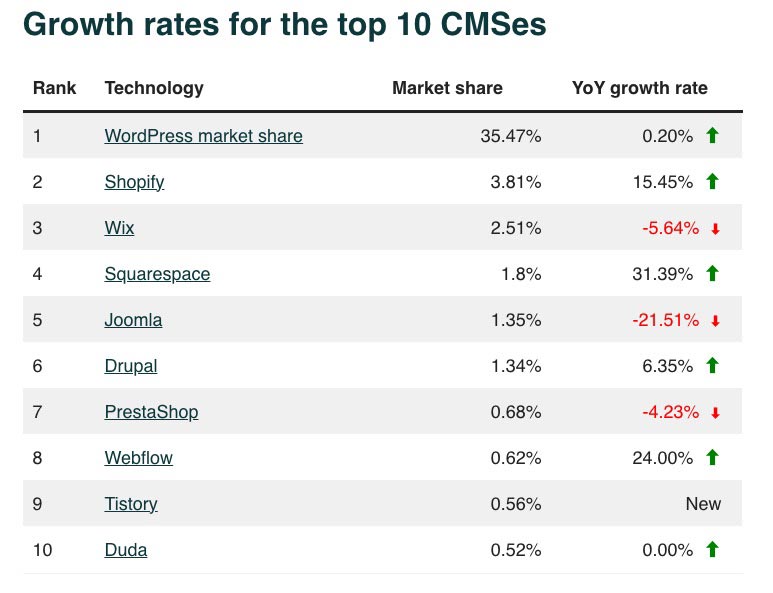
WordPress is the most popular CMS, powering over 40% of all websites. While this makes it a powerful platform, it also makes it a frequent target for hackers. Outdated plugins, themes, and core software can leave your site vulnerable to attacks.

A WordPress care plan includes:

  • Regular security updates to patch vulnerabilities.
  • Malware scans to detect and remove malicious code.
  • Firewall and security monitoring to prevent unauthorized access.

By keeping your site secure, a care plan helps protect your data and maintain trust with your users.

2. Regular Updates

WordPress core, themes, and plugins receive frequent updates to improve performance, fix bugs, and enhance security. However, applying these updates manually can be time-consuming and, if done improperly, could lead to conflicts that break your website.

With a WordPress care plan, all updates are handled for you, ensuring:

  • Your website stays current with the latest version of WordPress.
  • Plugins and themes are updated without causing conflicts.
  • Any issues that arise during updates are addressed quickly to prevent downtime.

3. Website Performance Optimization

A slow website can lead to a poor user experience, higher bounce rates, and lower search engine rankings. Regular optimization is needed to ensure your website loads quickly and runs smoothly.

A care plan includes performance optimization, such as:

  • Caching and speed enhancements to reduce load times.
  • Image optimization to improve performance without sacrificing quality.
  • Database cleaning to remove unnecessary data and improve efficiency.

These optimizations improve your website’s overall user experience, helping you retain visitors and increase conversions.

4. Backups and Recovery

Even with the best security measures, accidents can happen. Whether it’s a human error, a failed update, or a security breach, your website could face data loss or downtime.

A comprehensive WordPress care plan includes:

  • Regular backups stored securely in the cloud.
  • Quick recovery options in case of data loss, ensuring minimal downtime.
  • One-click restore to recover your site to a previous version if anything goes wrong.

Having reliable backups ensures that your business can recover quickly from any disruptions, protecting your revenue and reputation.

5. Support and Troubleshooting

Technical issues can arise at any time, from plugin conflicts to theme bugs or even hosting-related problems. If you don’t have in-house technical support, these issues can be overwhelming and costly to resolve on your own.

A WordPress care plan provides access to:

  • Ongoing technical support from WordPress experts.
  • Troubleshooting and problem-solving for issues that arise.
  • Proactive monitoring to detect and address problems before they impact your site.

With expert support at your disposal, you can focus on growing your business while professionals handle the technical aspects of your website.

Key Features of a WordPress Care Plan

Now that we understand why a WordPress care plan is essential, let’s dive into some of the key features typically included in a comprehensive plan:

1. WordPress Core, Plugin, and Theme Updates

Keeping your WordPress installation, plugins, and themes up to date is essential for security and functionality. A care plan ensures these updates are applied regularly without disrupting your site.

2. Daily or Weekly Backups

Regular backups are crucial to ensure that your data is safe in case of a security breach, technical issue, or accidental deletion. Backups can be stored offsite, giving you peace of mind that you can restore your website quickly if needed.

3. Security Monitoring

With a care plan, your website is continuously monitored for potential security threats. This includes malware scans, firewall protection, and measures to prevent hacking attempts.

4. Performance Optimization

A fast website is critical for user experience and SEO. Care plans often include services like caching, image optimization, and database maintenance to keep your website running efficiently.

5. Uptime Monitoring

Uptime monitoring ensures that your website remains online and accessible. If your site goes down, the issue is addressed quickly to minimize downtime and prevent revenue loss.

6. Technical Support

A dedicated support team is available to help you with any technical issues, from fixing bugs to resolving compatibility problems with plugins or themes. Having access to experts ensures that your website is always in good hands.

Benefits of a WordPress Care Plan

Investing in a WordPress care plan offers numerous benefits to website owners, including:

  1. Peace of Mind: You don’t have to worry about your website’s security, performance, or updates—everything is handled by professionals.
  2. Save Time: Managing a website takes time, especially when it comes to maintenance. A care plan allows you to focus on your business while experts manage your site.
  3. Preventative Care: Regular monitoring and updates prevent problems from escalating, ensuring your website remains in top shape.
  4. Cost Savings: Avoid the costly expenses associated with site repairs, data recovery, or rebuilding a hacked website. A care plan helps you avoid these emergencies with proactive maintenance.

How to Choose the Right WordPress Care Plan

When selecting a WordPress care plan, consider the specific needs of your website. Some key factors to keep in mind include:

  1. Level of Support: Determine the level of support your site requires, especially if you have complex functionality or rely on multiple plugins.
  2. Backup Frequency: Make sure the plan offers backups at intervals that make sense for your business, such as daily for eCommerce sites.
  3. Security Features: Look for a plan with comprehensive security measures, including malware scanning, firewall protection, and regular updates.
  4. Performance Enhancements: Ensure the plan includes speed optimization and regular performance checks to keep your site running fast.
  5. Pricing: Compare the cost of the care plan against the value of the services offered. A higher-tier plan may be worth the investment if your site is critical to your business operations.

Conclusion

A WordPress care plan is essential for ensuring the long-term success of your website. From regular updates and backups to performance optimization and security monitoring, a care plan provides peace of mind and protects your investment in your online presence.

Whether you run a small blog, an online store, or a business website, having professionals manage the technical aspects of your WordPress site allows you to focus on what matters most—growing your business. At Masthead Technology, we offer comprehensive WordPress care plans tailored to meet the unique needs of your website. Contact us today to learn more about how we can keep your website secure, fast, and functioning at its best.

FAQs

1. How often do I need to update my WordPress site?
You should update WordPress core, plugins, and themes regularly—ideally as soon as updates are released. A WordPress care plan ensures that updates are applied quickly and safely.

2. What happens if my website gets hacked?
With a WordPress care plan, your site is monitored for security breaches, and regular backups ensure that you can restore your site quickly if it gets hacked.

3. Can I manage my WordPress website updates on my own?
While it’s possible to manage updates yourself, it can be time-consuming and risky if conflicts arise between plugins or themes. A care plan handles updates and fixes potential issues for you.

4. How do I know if my website needs performance optimization?
If your website is loading slowly or has a high bounce rate, it may need performance optimization. A care plan typically includes regular speed checks and optimizations to keep your site running fast.

5. Do I need a care plan if my website is small?
Yes, even small websites need maintenance to stay secure and functional. A WordPress care plan ensures your site is always up to date and protected from potential issues.

In today’s digital age, having a website that is accessible to all users is not just a legal requirement but also a moral obligation and a business advantage. ADA compliance ensures that individuals with disabilities can access and navigate websites effectively, promoting inclusivity and equality. This article explores the significance of ADA compliance for websites and provides actionable steps to achieve it.

What is ADA Compliance?

ADA compliance refers to adhering to the standards set by the Americans with Disabilities Act (ADA), which prohibits discrimination against individuals with disabilities. In the context of websites, it means ensuring that online content is accessible to people with various disabilities. The ADA, enacted in 1990, has evolved to include digital accessibility, guided by the Web Content Accessibility Guidelines (WCAG).

Why ADA Compliance is Crucial

Adhering to ADA compliance is essential for several reasons. Legally, businesses must avoid potential lawsuits and penalties associated with non-compliance. Morally, it reflects a commitment to inclusivity and equal access for all users. From a business perspective, ADA compliance can enhance user experience, broaden audience reach, and improve brand reputation.

Impact on User Experience

An ADA-compliant website ensures that all users, including those with disabilities, have a positive experience. This inclusivity enhances user satisfaction and engagement. By removing barriers, businesses can cater to a wider audience, leading to increased traffic and potential conversions.

SEO and ADA Compliance

Accessibility and SEO are closely linked. Search engines favor websites that are user-friendly and accessible. Features like alt text for images, proper headings, and clear navigation benefit both accessibility and SEO. Thus, ADA compliance can contribute to better search engine rankings.

Legal Ramifications of Non-Compliance

Failing to comply with ADA standards can result in legal actions, including lawsuits and fines. There have been numerous high-profile cases where businesses faced significant penalties for non-compliance. Ensuring your website is ADA-compliant can mitigate these legal risks.

Understanding WCAG Guidelines

The WCAG provides a comprehensive set of guidelines to ensure web content is accessible to all users. These guidelines are based on four principles: Perceivable, Operable, Understandable, and Robust (POUR). Each principle has specific criteria that must be met to achieve different levels of conformance (A, AA, AAA).

Common Barriers to Accessibility

Websites can present various barriers to users with disabilities, including:

  • Visual Disabilities: Lack of alt text, poor color contrast
  • Auditory Disabilities: Missing captions or transcripts for audio content
  • Cognitive Disabilities: Complex navigation, confusing content layout
  • Motor Disabilities: Lack of keyboard accessibility, small clickable areas

Identifying and addressing these barriers is crucial for ADA compliance.

How to Make Your Website ADA Compliant

To achieve ADA compliance, consider the following steps:

  • Conduct an accessibility audit using tools like WAVE or Axe.
  • Follow WCAG guidelines to address identified issues.
  • Implement accessible design principles (e.g., proper color contrast, keyboard navigation).
  • Ensure all multimedia content has captions and transcripts.
  • Regularly test and update your website to maintain compliance.

Tools for Testing ADA Compliance

Several tools can help you assess and improve your website’s accessibility:

  • WAVE: Evaluates the accessibility of web content and provides feedback.
  • Axe: An open-source tool for automated accessibility testing.
  • Lighthouse: Google’s tool for performance and accessibility audits.
  • Manual Testing: Involving users with disabilities to get real-world feedback.

Designing for Accessibility

Good design is crucial for accessibility. Key practices include:

  • Color Contrast: Ensure sufficient contrast between text and background.
  • Text Alternatives: Provide alt text for images and non-text content.
  • Keyboard Navigation: Ensure all interactive elements are accessible via keyboard.
  • Focus Management: Manage focus states to improve navigation for screen readers.

Accessible Multimedia

Multimedia content must be accessible to users with disabilities. This includes:

  • Captions: Provide text captions for all audio content.
  • Transcripts: Offer full transcripts for audio and video content.
  • Audio Descriptions: Include descriptions of visual elements for users with visual impairments.

Forms and Accessibility

Accessible form design is critical for user interaction. Best practices include:

  • Clear Labeling: Ensure form fields are clearly labeled.
  • Error Messages: Provide descriptive error messages and instructions.
  • Keyboard Accessibility: Ensure all form elements are navigable via keyboard.

Mobile Accessibility

With increasing mobile usage, ensuring mobile accessibility is essential. Key practices include:

  • Responsive Design: Ensure the website is mobile-friendly.
  • Touch Targets: Make interactive elements easy to tap.
  • Text Scaling: Allow text to scale without breaking the layout.

ARIA and ADA Compliance

Accessible Rich Internet Applications (ARIA) attributes can enhance accessibility. ARIA helps make dynamic content and custom widgets accessible by providing additional information to screen readers.

Case Studies: Successful ADA Compliance

Many companies have successfully implemented ADA compliance, resulting in improved accessibility and business outcomes. Examples include major retailers and financial institutions that have made their websites accessible, avoiding legal issues and improving user satisfaction.

Myths about ADA Compliance

Several misconceptions surround ADA compliance:

  • “It’s only for large companies.”: All businesses, regardless of size, should comply.
  • “It’s too expensive.”: Many accessibility improvements are cost-effective.
  • “It’s only for blind users.”: Accessibility benefits users with various disabilities.

Debunking these myths can help businesses recognize the true value of ADA compliance.

Benefits Beyond Compliance

Beyond legal and moral obligations, ADA compliance offers numerous benefits:

  • Improved SEO: Enhanced search engine rankings due to accessible content.
  • Broader Audience Reach: Accessibility opens your website to a wider audience.
  • Enhanced Brand Reputation: Demonstrates a commitment to inclusivity and social responsibility.

Training and Resources

Several resources and training programs can help web developers and designers achieve ADA compliance:

  • Online Courses: Many platforms offer courses on web accessibility.
  • Certifications: Professional certifications in accessibility.
  • Guidelines: Detailed guidelines and best practices from organizations like W3C.

Keeping Up with Changes in Accessibility Standards

Accessibility standards evolve over time. Staying informed about updates and emerging trends is crucial for maintaining compliance. Regular audits and continuous learning can help businesses stay ahead.

FAQs

What is ADA compliance for websites?
ADA compliance ensures that websites are accessible to individuals with disabilities, following standards set by the Americans with Disabilities Act.

Why is ADA compliance important for my website?
ADA compliance is important for legal reasons, moral obligations, and business benefits, including improved user experience and SEO.

What are the WCAG guidelines?
WCAG guidelines provide a framework for making web content accessible to all users, based on principles of Perceivable, Operable, Understandable, and Robust (POUR).

How can I test my website for ADA compliance?
You can test your website using tools like WAVE, Axe, and Lighthouse, as well as manual testing methods involving users with disabilities.

What are some common accessibility barriers?
Common barriers include lack of alt text for images, poor color contrast, missing captions for audio content, and lack of

In the construction industry, having a strong online presence is crucial for building credibility, attracting clients and employees, and showcasing your services. A well-designed construction web page not only establishes your company’s professionalism but also serves as an essential marketing tool that drives leads and conversions. But what goes into effective construction web page design? In this post, we’ll explore the key elements that make for an engaging and functional website, tailored to the needs of construction companies.

Why Construction Web Page Design is Important

The construction industry is highly competitive, and your website is often the first impression potential clients have of your business. A well-designed website not only establishes credibility but also helps you stand out from competitors. Here’s why construction companies need a high-quality website:

  • Showcase Expertise: Your website is the perfect place to highlight past projects, client testimonials, and the services you offer.
  • Drive Conversions: A well-optimized website with clear calls-to-action (CTAs) can help convert visitors into leads, clients, or potential new employees.
  • Improve Local SEO: A properly designed website will improve your visibility in search engine results, helping local clients find you more easily.
  • Build Trust: An easy-to-navigate, professional website conveys trust, which is especially important in the construction industry, where clients look for dependable contractors.

Key Elements of Effective Construction Web Page Design

When designing a website for a construction company, certain elements are crucial to ensure it delivers the best possible experience for visitors. Here are the key features you need to focus on:

1. A Clear and Engaging Homepage

Your homepage serves as the gateway to your website and must communicate your company’s value proposition quickly and effectively. Visitors should be able to instantly understand what your construction company does and what sets it apart from competitors.

What to include on your homepage:

  • Hero Image or Video: Use high-quality images or a video background that showcases your best work or services in action.
  • Headline with Value Proposition: A clear, concise headline should explain what your company offers and why potential clients should choose you.
  • Call-to-Action (CTA): Include a prominent CTA such as “Request a Quote,” “Contact Us,” or “Schedule a Consultation” to encourage visitors to take action.
  • Navigation Menu: Make sure your navigation menu is intuitive and easy to use, guiding visitors to key sections like services, portfolio, and contact information.

See homepage that we built for the Benevento Companies below, which incorporates all of the elements of best-in-class construction web page design. For more information on the Benevento Companies website redevelopment project, read our case study here.

benevento companies homepage

2. Mobile-Friendly and Responsive Design

With a significant number of users accessing websites from mobile devices, your construction web page design must be fully responsive. A mobile-friendly design ensures that your website looks and functions properly on all screen sizes, including smartphones and tablets.

Why mobile-friendliness is important:

  • Improved User Experience: Mobile users expect fast load times and easy navigation. A responsive design helps you meet those expectations.
  • SEO Boost: Google prioritizes mobile-friendly websites in search rankings, which means a responsive website can improve your visibility in local and organic search results.

3. Service Pages that Convert

Dedicated service pages are an essential part of your construction web design. These pages should be optimized to highlight the range of services your company offers and convert visitors into clients.

Tips for effective service pages:

  • Detailed Descriptions: Provide detailed descriptions of each service, explaining what you offer, how you do it, and the benefits to the client.
  • Client-Focused Benefits: Focus on how your services solve problems for clients, reduce costs, or improve efficiency.
  • CTAs: Include clear, actionable CTAs such as “Request a Quote” or “Learn More” on every service page.
  • Supporting Visuals: Use photos or videos from past projects to demonstrate your experience and expertise in each service area.

4. A Portfolio or Projects Section

Your portfolio is one of the most critical sections of a construction website. It serves as visual proof of your company’s capabilities and helps potential clients see the quality of work you provide.

What to include in a portfolio:

  • High-Quality Images: Showcase your best work with professional, high-resolution images of completed projects.
  • Project Descriptions: Provide context for each project by including descriptions, timelines, and any specific challenges you overcame.
  • Before and After Comparisons: If applicable, include before-and-after images to show the transformation you achieved.
  • Client Testimonials: If possible, add client testimonials to your portfolio to build trust and credibility.

5. Lead Generation and Contact Forms

The primary goal of a construction website is often to generate leads, whether they be for sales or potential new employees. To achieve this, your website should make it easy for visitors to get in touch with you through contact forms, quote request forms, or phone call buttons.

Best practices for lead generation:

  • Simple Forms: Keep your forms short and straightforward. Only ask for essential information like name, email, phone number, and the service they are interested in.
  • Placement: Place contact forms in key locations such as the homepage, service pages, and dedicated “Contact Us” pages.
  • Clickable Phone Number: For mobile users, ensure that your phone number is clickable to make it easy for them to call you directly.

6. SEO-Optimized Content

Search engine optimization (SEO) is critical for helping your website rank in search engine results. With a well-optimized site, potential clients searching for local construction services will be more likely to find your business.

How to optimize for SEO:

  • Local SEO: Focus on local keywords (e.g., “construction services in [city]” or “general contractor near me”) to attract clients from your service area.
  • Meta Tags and Headings: Optimize your title tags, meta descriptions, and header tags with relevant keywords.
  • Structured Data: Implement structured data (schema markup) to enhance your visibility in search engine results, especially for local searches.
  • Blog or Resource Section: Regularly publish blog posts on topics like construction trends, project planning tips, or industry insights to help improve your site’s SEO.

7. Testimonials and Reviews

Positive client feedback is a powerful trust-building tool. Featuring testimonials and reviews on your website can help establish credibility and encourage new clients to reach out.

How to incorporate testimonials:

  • Featured Testimonials on the Homepage: Include a few standout client reviews on your homepage to immediately build trust.
  • Dedicated Reviews Page: Create a separate page for more detailed client testimonials or case studies.
  • Video Testimonials: If possible, include video testimonials, which can be more engaging and trustworthy than text-based reviews.

8. Fast Load Times

Website speed is critical for both user experience and SEO. A slow website can frustrate visitors and cause them to leave before they even see your content. Google also considers website speed as a ranking factor, so optimizing for fast load times is essential.

Tips for improving load times:

  • Optimize Images: Compress and resize images to reduce file size without sacrificing quality.
  • Use Caching: Enable caching to improve page speed by storing copies of your site’s pages.
  • Minimize Code: Minify CSS, HTML, and JavaScript to remove unnecessary elements that slow down your website.
  • Choose a Reliable Hosting Provider: Ensure your site is hosted on a reliable server with high uptime and fast performance.
  • Keep Your Website Up To Date: Make sure your core WordPress software, third party plugins, and underlying framework like php are all kept up to date. Working with a professional website maintenance and support agency will ensure your site stays up to date and functioning properly

Conclusion

A well-designed construction web page can be a powerful tool for attracting new clients, showcasing your work, and growing your business. By focusing on key elements like responsive design, strong CTAs, optimized SEO, and a comprehensive portfolio, your website can serve as a valuable asset for lead generation and brand building.

At Masthead Technology, we specialize in creating high-performance websites tailored to the construction industry. From mobile-friendly designs to SEO-optimized content, we can help you build a website that stands out in the competitive construction market. Contact us today to learn more about how we can help elevate your construction company’s online presence.

FAQs

### FAQs

1. Why is a mobile-friendly design important for a construction website?
With more users browsing on mobile devices, having a responsive, mobile-friendly design ensures that your website is accessible and user-friendly across all devices. It can also support better SEO performance.

2. What should I include in my construction portfolio?
Your portfolio should feature high-quality images, detailed project descriptions, timelines, project types, challenges solved, and client testimonials when available.

3. How can I optimize my construction website for SEO?
Optimize your website for SEO by focusing on local keywords, creating relevant title tags and meta descriptions, improving site speed, adding structured data, and regularly updating content through blog posts, service pages, and project updates.

4. What makes a good CTA for a construction website?
A good CTA should be clear, actionable, and placed prominently on your website. Examples include “Request a Quote,” “Contact Us,” “Schedule a Consultation,” or “View Our Projects.”

5. How often should I update my construction website?
It’s a good practice to update your website regularly, ideally at least once a month, by adding new projects, publishing blog content, refreshing service information, and keeping software, plugins, and website functionality up to date.

6. What should the homepage of a construction website include?
A construction website homepage should include a clear headline, strong hero image or video, brief service overview, featured projects, trust signals, testimonials, and a prominent call to action.

7. Why are dedicated service pages important for construction companies?
Dedicated service pages help visitors understand exactly what your company offers and give search engines more specific content to rank. Each service page should explain the service, show related project examples, and include a clear next step.

8. How can a construction website build trust with potential clients?
A construction website can build trust by showcasing completed projects, client testimonials, reviews, certifications, team experience, safety credentials, and clear contact information.

9. What contact features should a construction website have?
A construction website should include easy-to-find phone numbers, clickable mobile phone links, simple quote request forms, contact forms on key pages, and clear expectations for how quickly your team will respond.

Turn Insights Into Action

Need Help With Your Website?

Reading about website strategy is a good start. Applying it to your own business is where the value comes from.

If your current website is outdated, difficult to update, missing project content, underperforming in search, or not supporting recruiting and lead generation the way it should, Masthead can help you identify the right next steps.

Frequently Asked Questions

Blog FAQs

What topics does the Masthead Technology blog cover?

The Masthead Technology blog covers website design, construction SEO, project portfolio systems, website support, integrations, digital strategy, recruiting-focused web content, and online visibility for construction companies and related businesses.

This blog is written for construction companies, contractors, developers, engineers, architects, MEP firms, landscaping companies, specialty trades, and other project-driven businesses that want to improve their websites and digital presence.

Yes. Masthead writes about construction SEO topics including service page strategy, project-based SEO, local SEO, technical SEO, internal linking, content planning, metadata, and Google Search Console insights.

Yes. Project content can help showcase real experience, support SEO, build credibility, and give potential clients or employees a better understanding of the work a company performs.

Yes. Masthead Technology provides website design, website support, project portfolio systems, construction SEO, integrations, and ongoing digital strategy for construction companies and related businesses.

Yes. Masthead Technology works with construction companies, contractors, developers, engineers, and related businesses across the United States.

Practical Website Strategy

Guidance From Real Construction Website Projects

Our insights come from hands-on work with construction companies, contractors, developers, and project-driven businesses, not generic marketing theory.

Explore practical articles on website design, construction SEO, project portfolios, support, integrations, and digital strategy built around the real challenges companies face when trying to win work, attract talent, and grow online.

macbook_pro_2023
iphone_15_pro
ipad
Free Website Assessment

Website Assessment

Contact us today for a free consultation.

This field is for validation purposes and should be left unchanged.
Newsletter